# Deployment, Discovery,
and
Optimization
Working on localhost is not the finish line. Today your application goes public: deployed, reachable through a real domain, discoverable by search engines, and tested the way real users will actually experience it.
You'll deploy with Vercel, connect a custom domain through Cloudflare, prepare the site for search engine discovery, and use Google PageSpeed Insights to identify meaningful improvements instead of chasing a score.
## Before You Start
You should be able to do all of this already — flag an instructor if not:
- A working web application
- A GitHub repository containing the application
- Basic Git and GitHub knowledge
- A working Firebase configuration
- Authentication working locally
- Persistent data working locally
- Familiarity with browser Developer Tools
- Experience using Codex or Claude Code
## Local Development vs. Production
An app working on localhost doesn't mean it's ready for
real users. Production brings its own considerations: hosting,
domains, DNS, environment variables, external services, security,
performance, accessibility, and search engine discovery.
- Localhost is your environment; production is everyone's
- Configuration can differ between the two environments
- Environment variables may need to be set up separately for production
- External services (like Firebase) can behave differently in production
- Production must be tested independently — never assume it "just works"
## Deploying with Vercel
Vercel connects directly to your GitHub repository and builds/deploys your app automatically. That gives you a simple, repeatable workflow:
- Connect the correct repository
- Understand your build settings
- Configure environment variables in Vercel
- Read deployment logs when something goes wrong
- Know the difference between a successful and a failed deployment
- Verify the deployed app actually works — don't just trust the green checkmark
- Future GitHub pushes can automatically trigger new deployments
- A successful deployment doesn't guarantee your app is correct
## Domains and DNS
Hosting and domains solve two different problems. Vercel hosts your app. Your domain is the human-readable address. DNS tells the internet where that domain should actually point — and Cloudflare is where you manage that.
- Domain
- DNS & DNS records
- A records
- CNAME records
- Root domain vs. subdomain
- DNS propagation
- HTTPS
- Vercel domain verification
## Production Verification
Once deployed, test your app again — in production, not just locally.
- Test navigation and important routes
- Test authentication, sign-up, and sign-in
- Test Firestore reads and writes
- Test refresh behavior
- Test on more than one screen size
- Inspect the browser console
- Check for failed network requests
- Verify environment variables actually loaded
- Check for broken assets
- Verify HTTPS is working
- Test in a fresh/private browser session when useful
- Test the final custom domain, not only the temporary Vercel URL
## Search Engine Discovery
Publishing a site doesn't automatically make it appear in search results. Search engines have to discover, crawl, understand, and index your pages first.
- Crawling & indexing
- Page titles & meta descriptions
- Semantic HTML
- robots.txt
- Sitemap
- Internal navigation
- Publicly accessible pages
- Search engine webmaster tools
## Google Search Console & Bing Webmaster Tools
These tools let you tell search engines about your site directly, and let you inspect how they see it.
- Add or verify your website
- Verify domain ownership when required
- Submit a sitemap
- Inspect specific URLs
- Review indexing information
- Identify crawl or indexing issues
## PageSpeed Insights
A website shouldn't just function — it should be usable. PageSpeed Insights surfaces opportunities across performance, accessibility, best practices, and SEO.
- Test the production URL, not localhost
- Review mobile results (and desktop when useful)
- Identify high-impact problems first
- Understand a recommendation before changing any code
- Don't blindly apply every suggestion
- Make one meaningful improvement at a time
- Redeploy, then retest
## Production Debugging
Production problems follow the same evidence-based process you already know — with one extra step.
- Read Vercel build logs
- Inspect browser errors and network requests
- Verify environment configuration
- Verify DNS
- Verify Firebase behavior specifically in production
- Isolate which layer is actually failing
- Give Codex or Claude Code specific evidence
- Test locally when appropriate, then test again in production after deploying
## Prompt Templates You Can Use
Copy these into Codex or Claude Code and fill in the bracketed fields.
## Worked Example
The instructor will continue the Study Task Tracker from Day 2 and take it through the full production journey: from GitHub to a public custom-domain application that has been verified, prepared for discovery, measured, and improved.
- Open the completed Day 2 application and confirm it's pushed to GitHub.
- Connect the repository to Vercel.
- Review the project's deployment configuration.
- Configure required environment variables.
- Deploy the application.
- Open the Vercel production URL and test key functionality, including Firebase auth and data.
- Review the production browser console.
- Add a custom domain to the Vercel project.
- Open Cloudflare DNS management and configure the required records (which records you add depends on whether the site is hosted on Vercel or GitHub Pages — see the comparison below).
- Verify the domain connects, then open the app using the custom domain.
- Verify HTTPS and re-test app functionality.
- Review robots.txt and the sitemap.
- Walk through Google Search Console and Bing Webmaster Tools.
- Demonstrate sitemap submission or URL inspection.
- Run the production URL through PageSpeed Insights and review the report.
- Pick one meaningful improvement, implement, test locally, commit, and push.
- Let Vercel redeploy, verify the change in production, and rerun PageSpeed Insights to compare.
Deploy the application on Vercel
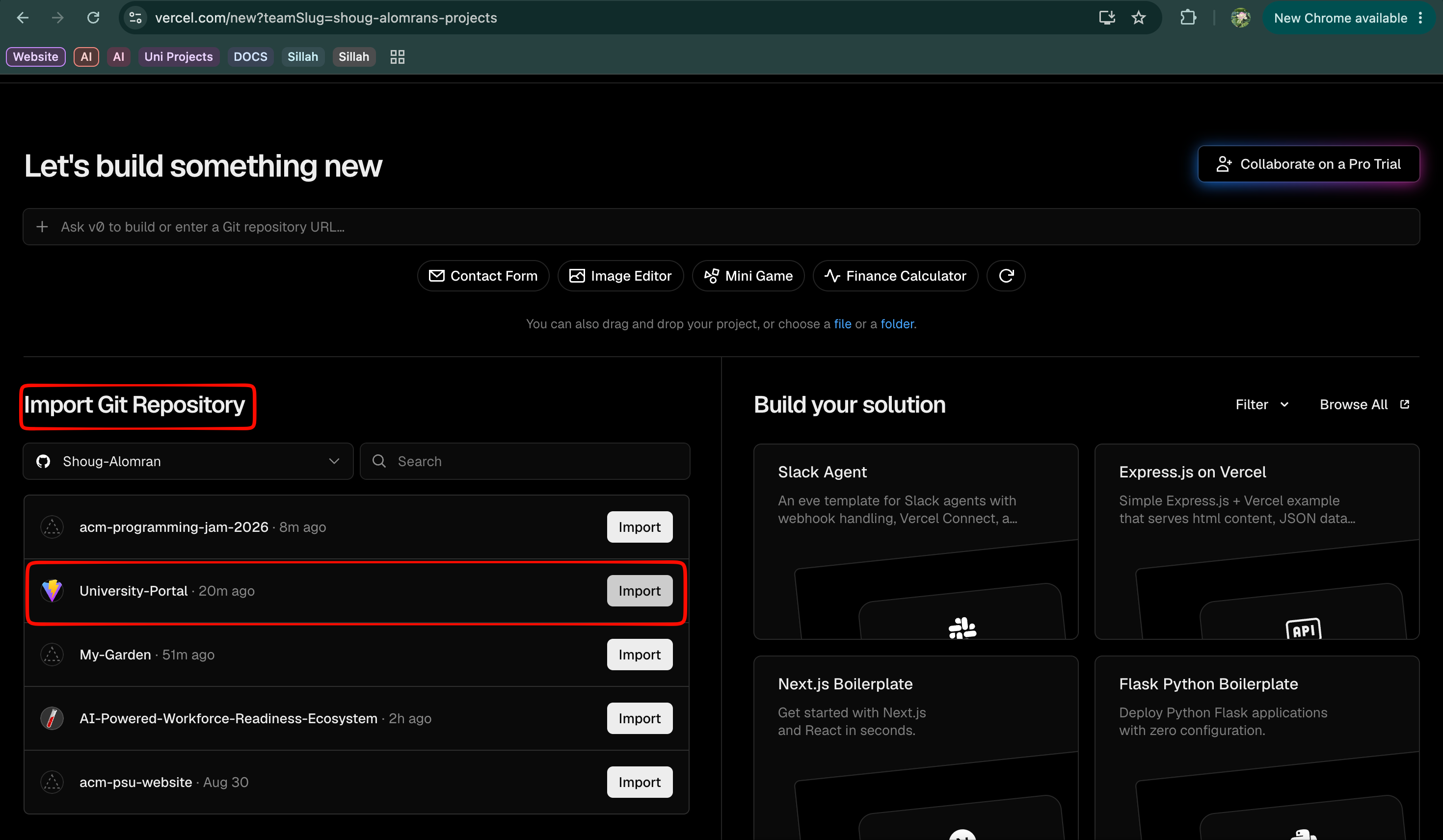
01-vercel-import-repository.png
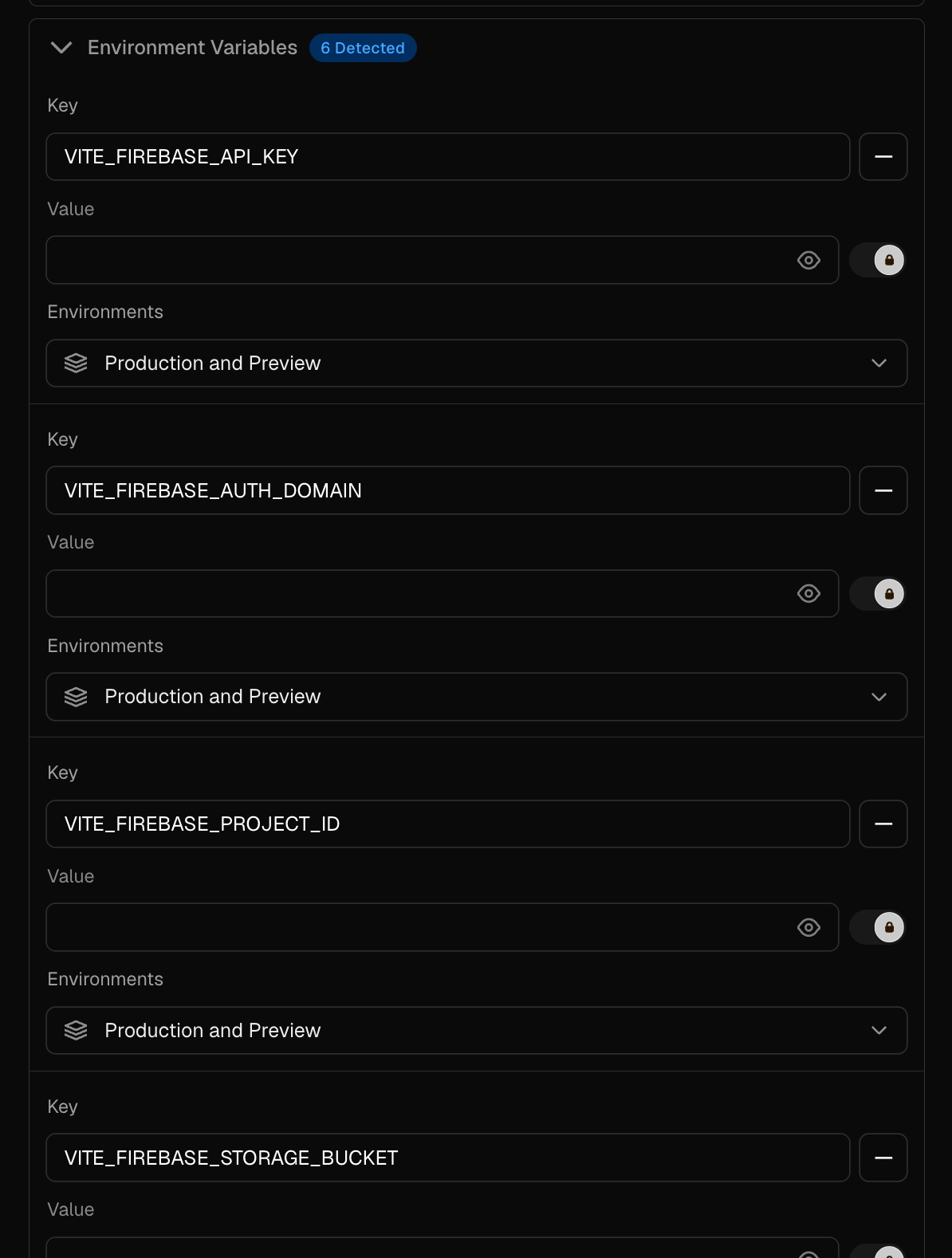
02-vercel-environment-variables.png

02-vercel-environment-variables-2.png
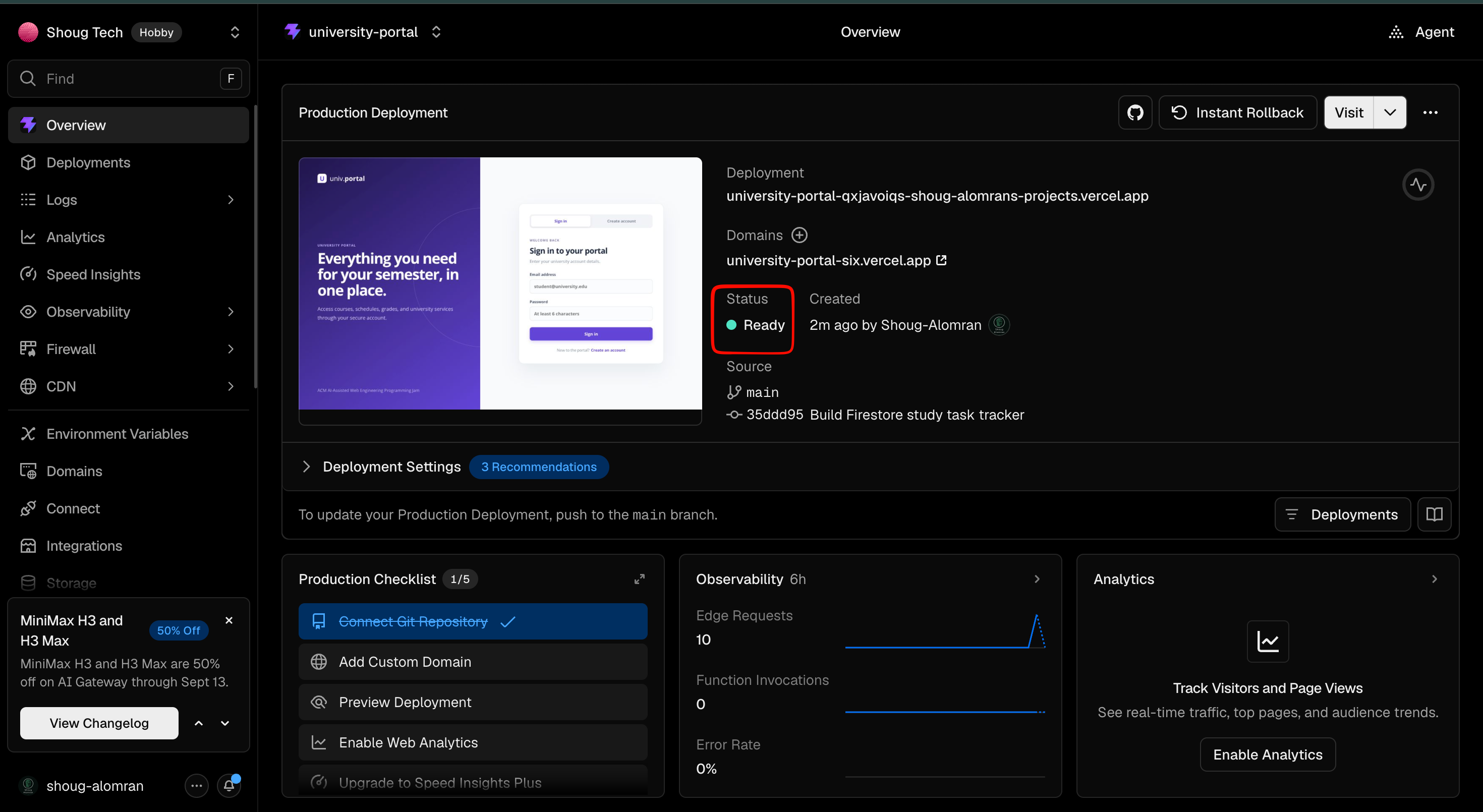
03-vercel-deployment-success.png
Choose where the site is hosted before touching DNS
Vercel is not the only option. A repository can also be published straight from GitHub with GitHub Pages, and both routes can sit behind the same Cloudflare domain. The DNS records you add are different for each one, so decide the host first, then add only that host's records.
The project has a build step or secrets
Anything built with Vite, React, Next.js or a framework, anything that reads environment variables such as the Firebase keys from Day 2, anything with server routes or API functions, or when you want an automatic preview deployment for every push. This is the route the Jam projects take.
your-subdomain
→ the
….vercel-dns-017.com value Vercel shows you
· Proxy status: DNS only
The site is plain static files
Hand-written HTML, CSS and JavaScript, or a pre-built folder committed to the repository, with no environment variables and no server code. It is free, it publishes directly from a branch, and it is the simplest option for a portfolio page or documentation site — but it cannot hide secrets or run a backend.
185.199.108.153, 185.199.109.153,
185.199.110.153, 185.199.111.153Subdomain: CNAME →
your-username.github.io · Proxy status:
DNS only
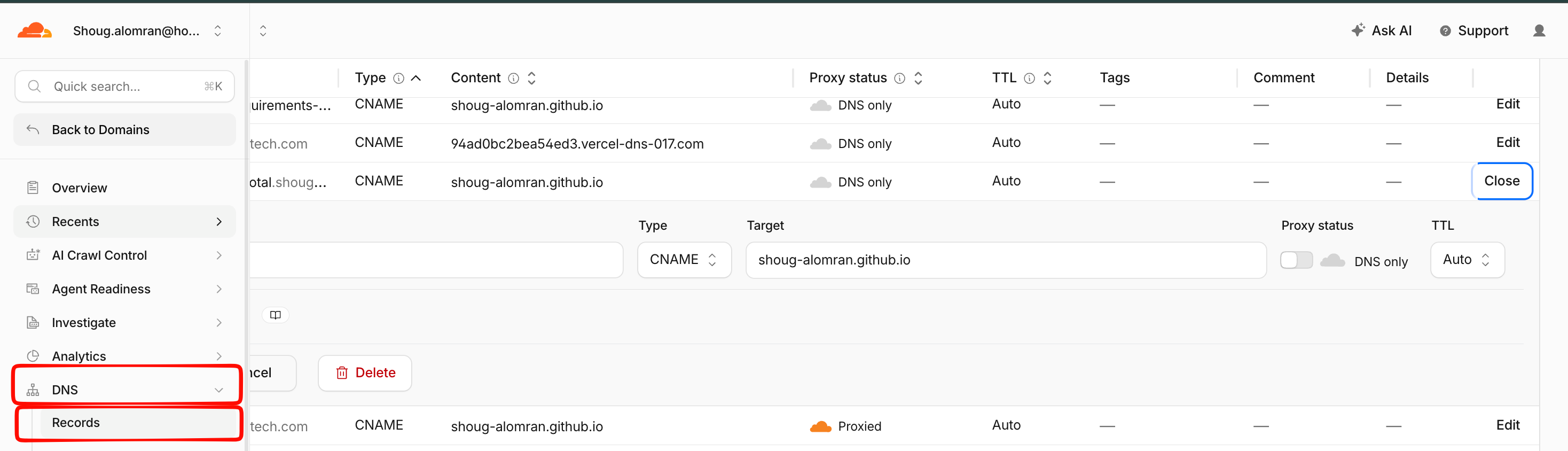
04-cloudflare-dns-records.png
Path A — hosting on Vercel
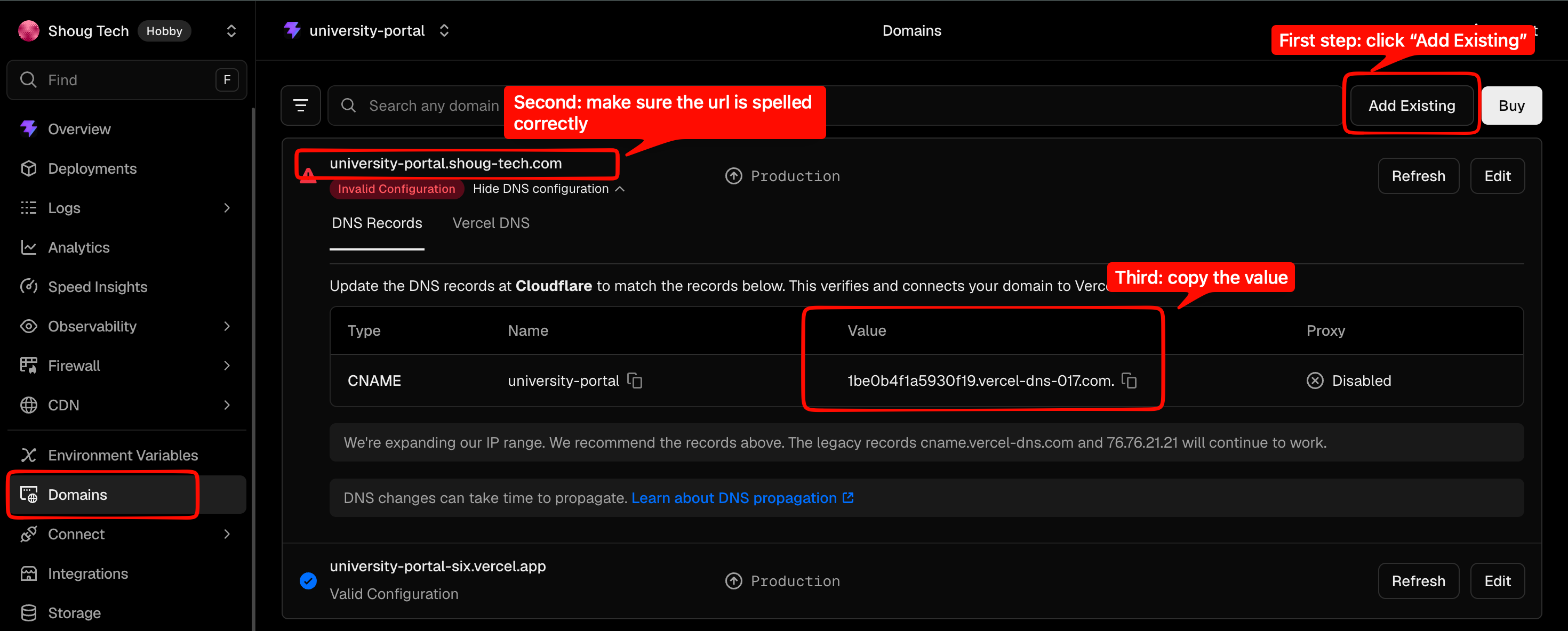
04-cloudflare-dns-records-for-vercel-1.png

04-cloudflare-dns-records-for-vercel-2.png
Path B — hosting on GitHub Pages
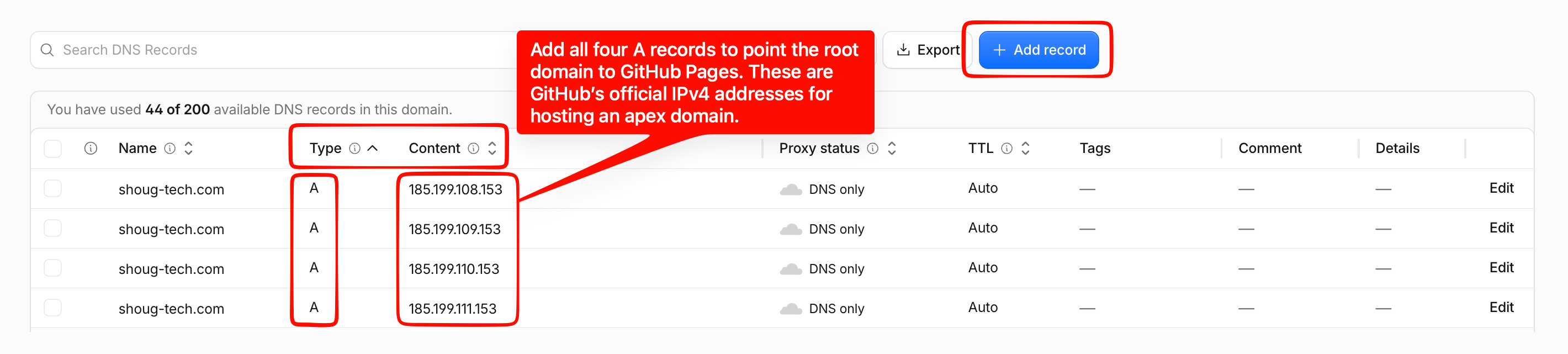
04-cloudflare-dns-records-for-github.png
Verify the live domain (both paths)
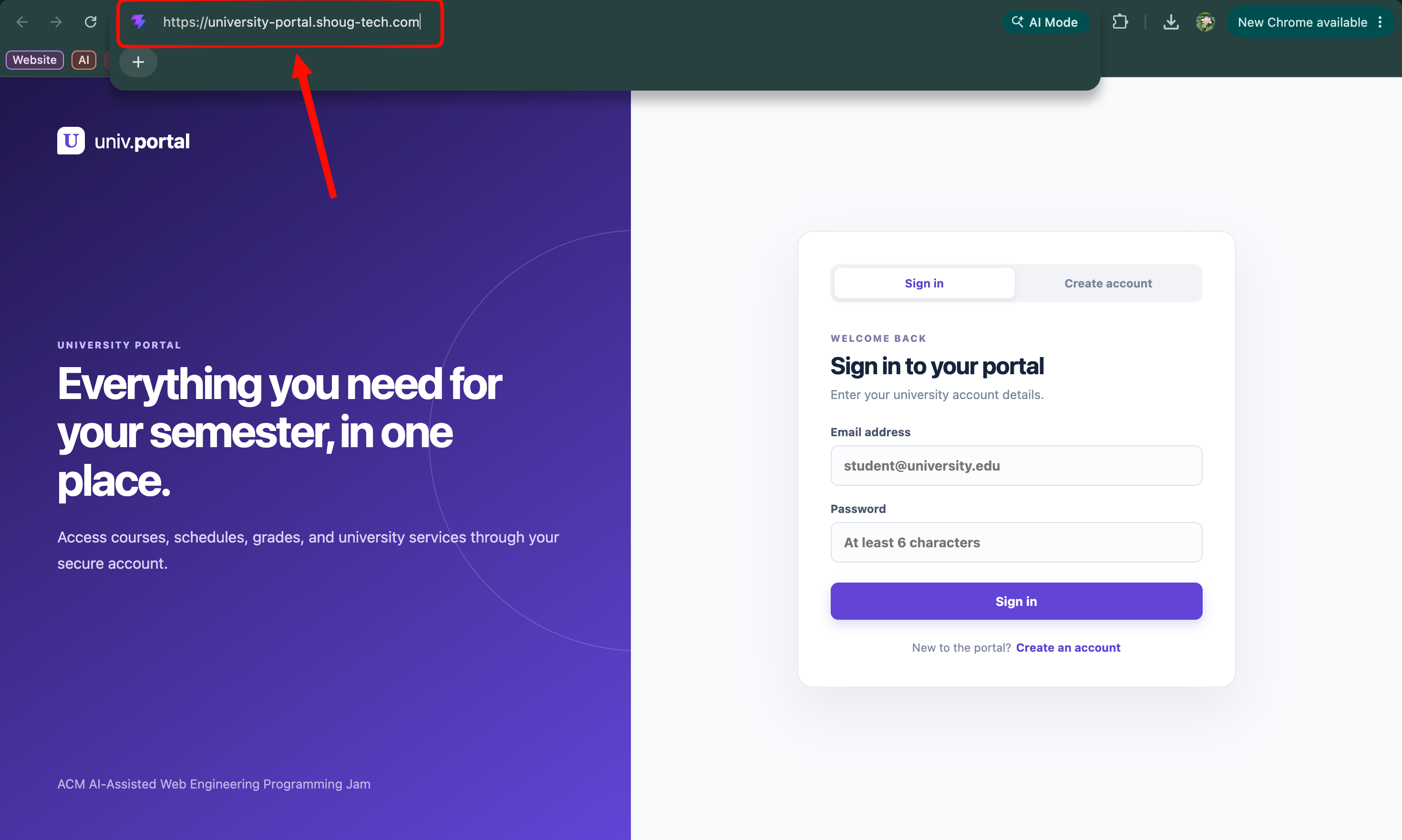
05-custom-domain-https-working.png
Make the site discoverable
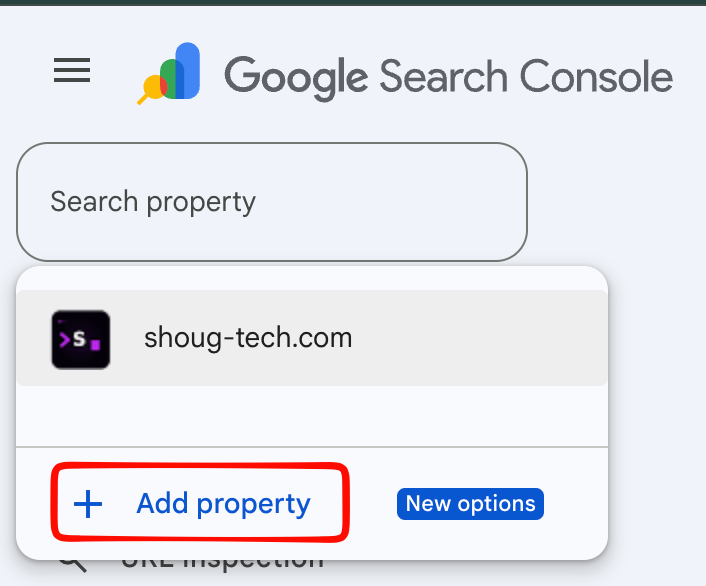
06-google-search-console-sitemap.png
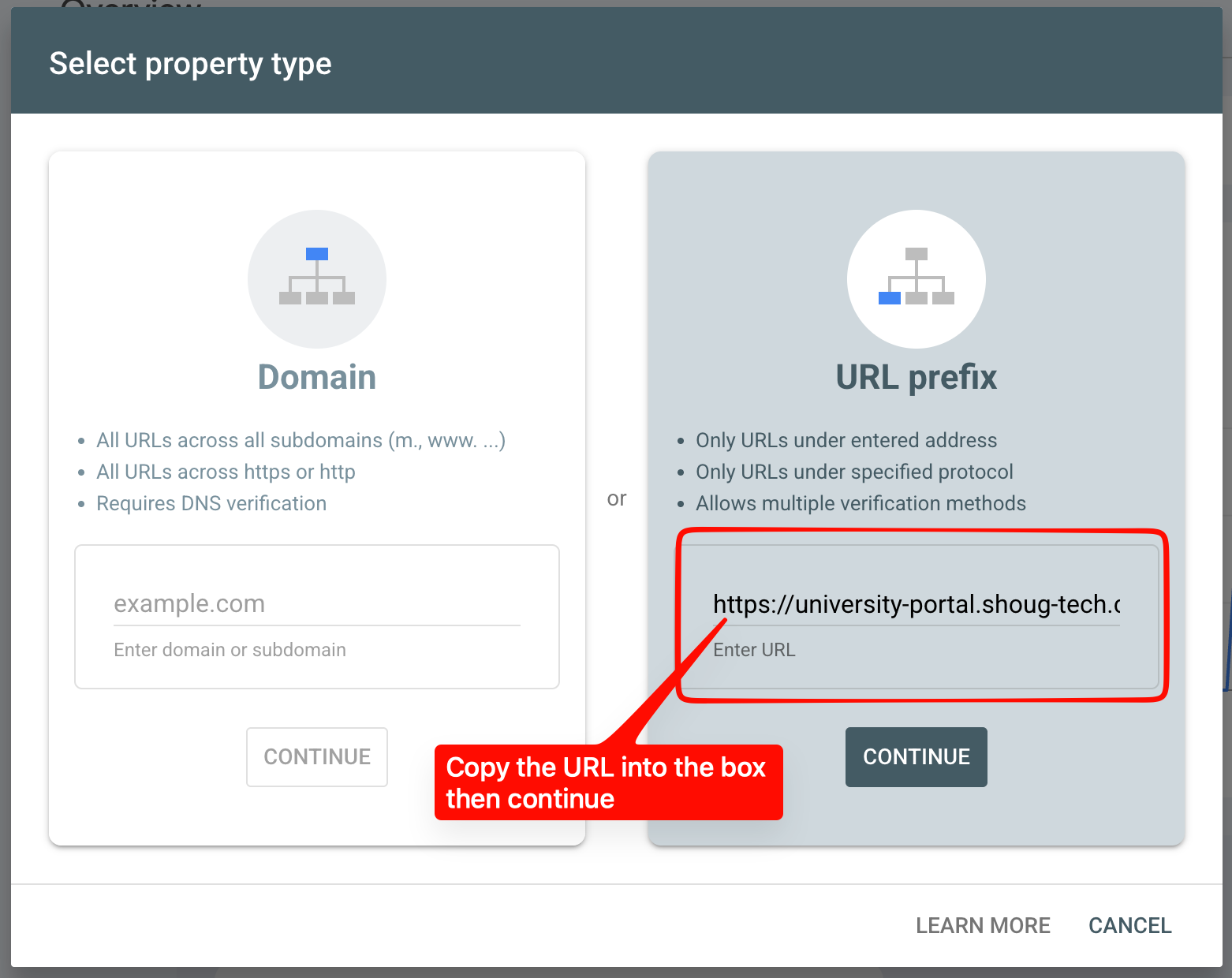
06-google-search-console-sitemap-2.png
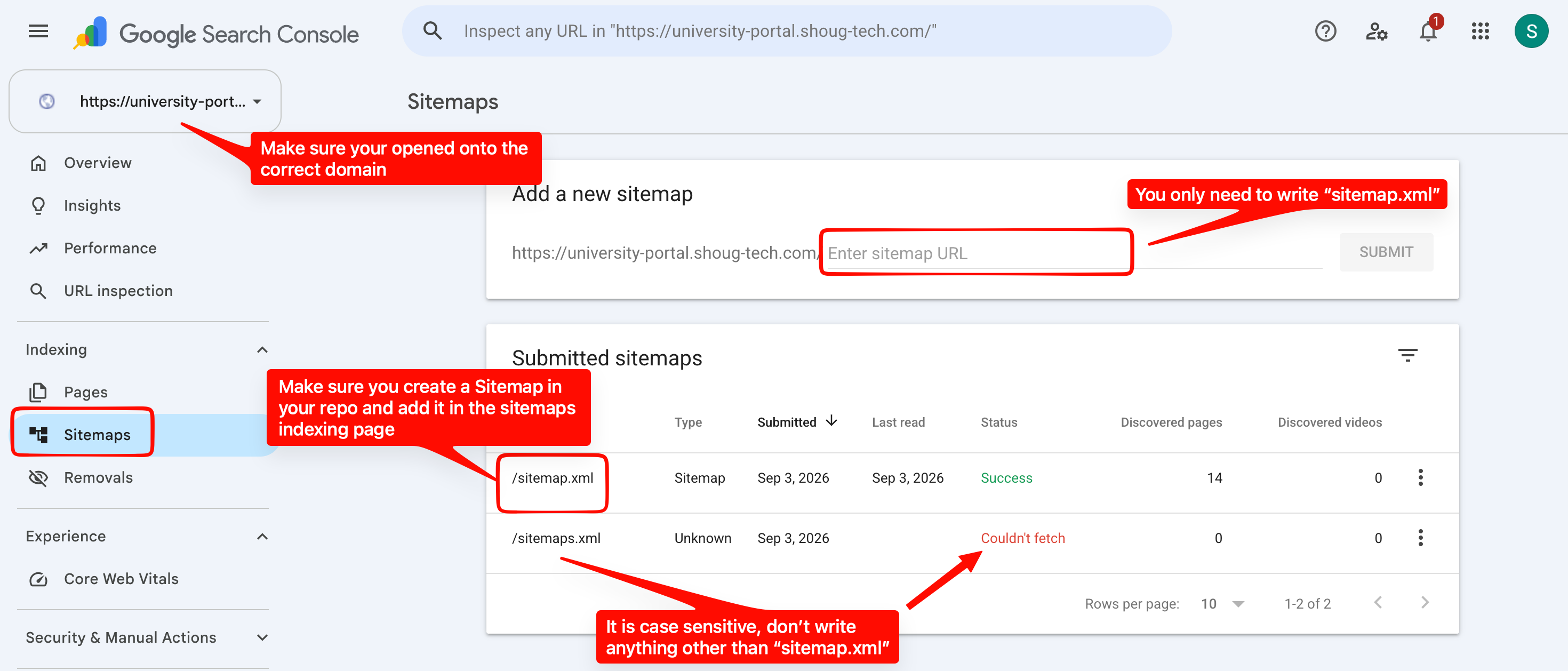
06-google-search-console-sitemap-3.png
Measure, improve, redeploy

07-pagespeed-before-optimization.png

08-pagespeed-after-optimization.png
## Your Exercise
Continue the Campus Event Board from Days 1 and 2 and take it through the same production journey.
Steps
- Verify the application works locally, then commit and push any working changes.
- Connect the repository to Vercel and configure required environment variables.
- Deploy the application, then open the production URL.
- Test the app's critical functionality, Firebase authentication, and persistent data.
- Inspect the browser console for production errors.
- Configure your assigned domain or subdomain, and the required Cloudflare DNS records.
- Verify the domain connects successfully and that HTTPS works.
- Test the app again using the custom domain.
- Verify basic page metadata, and create/verify robots.txt and a sitemap where appropriate.
- Configure Google Search Console and Bing Webmaster Tools; submit or verify your sitemap.
- Run the production URL through PageSpeed Insights and review the results.
- Identify one meaningful improvement, implement and test it, then commit and push.
- Verify the new Vercel deployment, retest production, and document your final production URL.
You're done when...
- Your application is deployed through Vercel and loads successfully
- Required environment variables are configured
- Firebase authentication and persistent data both work in production
- Your custom domain or assigned subdomain resolves correctly, over HTTPS
- Critical app functionality has been tested in production
- Basic search engine discovery requirements have been reviewed
- Google Search Console and Bing Webmaster Tools have been configured
- Your production site has been analyzed with PageSpeed Insights
- At least one meaningful improvement has been identified and made
- Your final production URL is ready to share
- Your final working production checkpoint is committed to GitHub
## Troubleshooting
Hit one of these? Work through it before asking for help.
App works locally, but the Vercel build fails
The site deploys, but Firebase doesn't work
The Vercel URL works, but your custom domain doesn't
PageSpeed score is lower than expected
A route works through navigation, but refreshing it fails
Your site isn't showing up in search results yet
## Self-Check Before You Leave
Can you tick all of these? If not, flag an instructor before the session ends.
- A working Vercel production deployment
- A connected custom domain or assigned subdomain
- Correct DNS configuration
- HTTPS access
- Working authentication in production
- Working persistent data in production
- Successful production functionality testing
- An understanding of robots.txt and sitemaps
- An understanding of Google Search Console and Bing Webmaster Tools
- A PageSpeed Insights report for your production website
- At least one identified improvement
- The ability to investigate a production failure using evidence
- A final production URL you can share with others